প্রিন্ট এর তারিখঃ অক্টোবর ৯, ২০২৬, ২:১৯ পি.এম || প্রকাশের তারিখঃ অক্টোবর ৯, ২০২৬, ১০:১৮ এ.এম
![]()
Reading RSS Feed Items: Title, Description, Content, Source URL, Publication Date, and Images
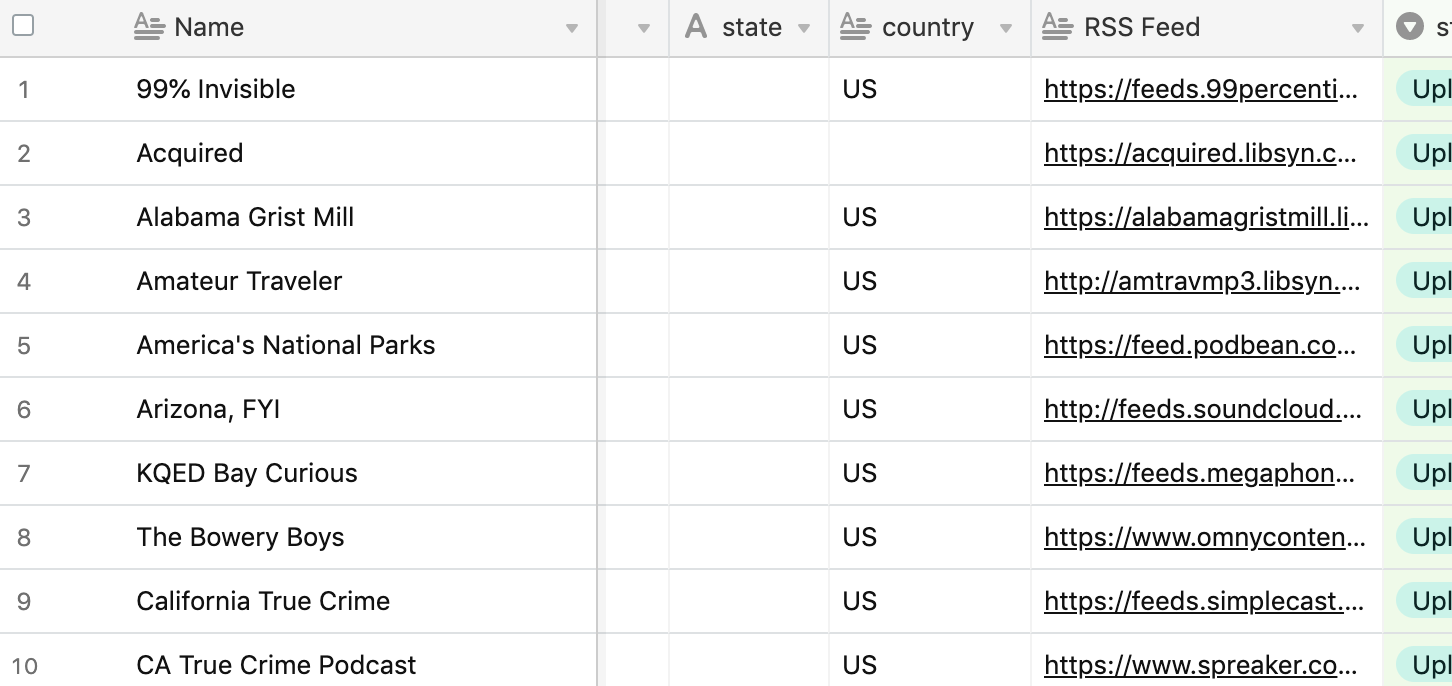
An RSS item is a structured XML record, and every field in it carries a different kind of information — a headline, a summary, the full article body, a canonical link, a timestamp, and zero or more images. Reading those fields correctly means knowing which element to trust for which job: title for display, description for previews, content:encoded for full-text, link for attribution, pubDate for ordering, and enclosure or media:content for images that actually render.
Most feed problems — duplicate posts, missing thumbnails, out-of-order timelines, broken attribution links — trace back to one field being used where another belongs. This guide walks through each element, what it reliably contains, and how to handle it in a production feed reader or content pipeline.
What an RSS Item Actually Is
An RSS feed is a single XML document containing a channel and a list of items. Each
That modular design is the reason feed parsing is harder than it looks. A title is always a title, but "the image" might live in ![]()
The Atom format (standardized in RFC 4287{:target="_blank" rel="noopener"}) solves some of this with stricter rules, but a large share of the web still publishes RSS 2.0, so any reader worth building handles both.
The Core Fields, One by One
| Field | Typical element | What it gives you | Common pitfall |
|---|---|---|---|
| Title | </code> | Headline, often plain text | May contain HTML entities that need decoding |<br />
| Description | <code></code> | Summary or full content, depending on the publisher | Truncated snippets, encoded markup, or entire articles |<br />
| Content | <code></code> | Full article body in HTML | Frequently missing; not part of the RSS 2.0 core spec |<br />
| Source URL | <code></code> and <code></code> | Canonical permalink and unique identifier | <code>guid</code> is not always a URL |<br />
| Publication date | <code></code>, <code></code>, <code></code> | When the item was published or last modified | Multiple conflicting formats in the same feed |<br />
| Images | <code></code>, <code></code>, <code></code> | Image URLs with optional dimensions and MIME types | Thumbnails are hotlink-protected or low resolution |</p>
<div class="wp-block-image">
<figure class="aligncenter"><img width="100%" src="https://help.presspage.com/hc/article_attachments/6359960283804" alt="Title" /><figcaption class="wp-element-caption">Source: <a href="https://help.presspage.com/hc/en-us/articles/360003931391-RSS-feed-module">help.presspage.com</a></figcaption></figure>
</div>
<h3>Title</h3>
<p>The title is the field you display and the field readers scan. Treat it as text, not markup: strip any tags that appear, decode HTML entities such as <code>&</code> and <code>’</code>, and normalize whitespace.</p>
<p>Two quirks show up repeatedly. First, some publishers prefix every title with the site name, producing "Article Headline – Site Name" in every entry. Second, podcast and newsletter feeds sometimes leave the title empty and put everything in the description. A robust reader has a fallback: if the title is blank, derive one from the first line of the description, then from the URL slug.</p>
<div class="wp-block-image">
<figure class="aligncenter"><img width="100%" src="https://pagecrawl.io/images/blog/best-rss-feed-monitoring-tools.png" alt="Description" /><figcaption class="wp-element-caption">Source: <a href="https://pagecrawl.io/blog/best-rss-feed-monitoring-tools">pagecrawl.io</a></figcaption></figure>
</div>
<h3>Description</h3>
<p>In RSS 2.0 the spec calls <code>description</code> "the item synopsis," but in practice it is one of three things depending on the publisher:</p>
<ul>
<ol>
<li>A short hand-written summary, ideal for previews and cards</li>
<li>A truncated excerpt with a "read more" link</li>
<li>The complete article body, HTML-encoded into the XML</li>
<p>Because of this ambiguity, never assume the description is short. Measure it. If a description routinely exceeds a few thousand characters, the publisher is treating it as full content and your truncation logic should kick in before rendering.</p>
<p>Note that description content is usually escaped: <code></p>
<p></code> arrives as <code><p></code>. Decoding it before display is mandatory, and sanitizing it afterward is not optional — feed content is untrusted input.</p>
<div class="wp-block-image">
<figure class="aligncenter"><img width="100%" src="https://uploads-us-west-2.insided.com/klaviyo-en/attachment/01d62009-2d61-4de1-8c28-56f484317f60.png" alt="Content" /><figcaption class="wp-element-caption">Source: <a href="https://community.klaviyo.com/marketing-30/content-encoded-11953">community.klaviyo.com</a></figcaption></figure>
</div>
<h3>Content</h3>
<p>The <code>content:encoded</code> element comes from the RSS 1.0 Content Module (<code>http://purl.org/rss/1.0/modules/content/</code>), not from RSS 2.0 itself. When it exists, it holds the full post in HTML — headings, images, code blocks, embedded media.</p>
<p><strong>Prefer <code>content:encoded</code> over <code>description</code> whenever both are present and your use case calls for full text.</strong> If it is absent, fall back to description, then to fetching the source URL directly.</p>
<p>Atom feeds handle this more cleanly with a <code></code> element that declares its own <code>type</code> attribute (<code>html</code>, <code>text</code>, or <code>xhtml</code>), so you know exactly what you are decoding before you decode it.</p>
<p><h3>Source URL and Identifier</h3>
<p>Two elements overlap here, and conflating them causes real bugs.</p>
<p><code></code> is the item's permalink — the page a reader should open to read the original. It is what you attribute, what you canonicalize against, and what you send in a newsletter. Always resolve it against the feed's base URL if it is relative, and strip tracking parameters such as <code>utm_source</code> before storing it.</p>
<p><code></code> is a permanent identifier. It signals "this is the same item I sent you before." Critically, the <code>isPermaLink</code> attribute determines whether the GUID is a URL:</p>
<li><code>isPermaLink="true"</code> (the default) — the GUID is probably a URL, but you should still not treat it as the clickable destination</li>
<li><code>isPermaLink="false"</code> — the GUID is an opaque string, possibly a UUID or a database key</li>
<p>Use <code>guid</code> for deduplication. Use <code>link</code> for navigation. When <code>guid</code> is missing, which happens in loose Atom-to-RSS conversions, fall back to a hash of the link plus the title.</p>
<p><h3>Publication Date</h3>
<p>Dates are where feed parsing breaks most often. RSS 2.0 specifies <a href="https://www.rfc-editor.org/rfc/rfc822">RFC 822</a> date formatting, which looks like <code>Tue, 14 May 2024 09:30:00 GMT</code>. Atom uses RFC 3339 timestamps such as <code>2024-05-14T09:30:00Z</code>. Dublin Core contributes <code>dc:date</code> in yet another shape. Some feeds include timezone offsets, some omit them entirely, and some send nonsense.</p>
<p>Practical handling:</p>
<li>Parse against a list of known formats in priority order rather than a single strict pattern.</li>
<li>Treat a missing timezone as UTC rather than local server time — otherwise your ordering shifts by hours.</li>
<li>Keep <code>pubDate</code> and <code>updated</code> separate. The first is when the item appeared; the second is when it last changed. Sorting a timeline by <code>updated</code> reshuffles old posts to the top, which surprises readers.</li>
<li>Reject dates more than a few days in the future. Future-dated items are almost always a publisher misconfiguration and will pin themselves permanently to the top of the feed.</li>
<p><h3>Image URLs</h3>
<p>There is no single "image" element in RSS 2.0, so extraction follows a cascade. Check in roughly this order:</p>
<li><code></code> — the original podcast-era mechanism, still the most reliable when present</li>
<li><code></code> — Media RSS, which adds <code>width</code>, <code>height</code>, and <code>type</code></li>
<li><code></code> — explicitly a small preview image, often 144px or smaller</li>
<li><code></code> — podcast artwork, usually square and site-level rather than per-episode</li>
<li>First <code><img src="..."></code> inside <code>content:encoded</code> or <code>description</code> — the least reliable option, but sometimes the only one</li>
<p>Two rules make this manageable. Prefer the largest available image, since downscaling looks better than upscaling; and honor <code>media:thumbnail</code> only as a last resort, because thumbnails frequently point to CDN-hosted assets that block hotlinking or expire.</p>
<p>Also watch for <code>media:group</code>, which bundles multiple renditions of the same asset. Pick one from the group rather than treating each rendition as a separate image.</p>
<p><h2>A Practical Reading Order for Feed Parsers</h2>
<p>When you ingest a new item, process the fields in this sequence to avoid rework:</p>
<li><strong>Deduplicate first.</strong> Compare the <code>guid</code>, or a hash of <code>link</code> plus <code>title</code>, against your store. Skip anything already seen before doing any other work.</li>
<li><strong>Establish the canonical URL.</strong> Resolve <code>link</code> to an absolute URL and strip tracking parameters.</li>
<li><strong>Determine content depth.</strong> If <code>content:encoded</code> exists, use it. Otherwise use <code>description</code>. Otherwise queue the source URL for full-text extraction.</li>
<li><strong>Sanitize the HTML.</strong> Decode entities, strip scripts, iframes, and inline event handlers, and restrict allowed tags to what your design supports.</li>
<li><strong>Resolve the primary image.</strong> Walk the cascade above and store the winning URL along with its dimensions if the feed supplied them.</li>
<li><strong>Normalize the timestamp.</strong> Parse to UTC, validate plausibility, and store both <code>pubDate</code> and <code>updated</code> as separate columns.</li>
<li><strong>Fetch and cache images locally.</strong> Hotlinked images disappear. Downloading and re-hosting them keeps your archive intact and gives you a stable URL for social cards.</li>
<p><h2>Why Attribution Depends on Getting These Fields Right</h2>
<p>Feed content is syndicated content, and syndication carries obligations. The <code>link</code> element is your attribution channel: any republished excerpt should point back to it, and any AI-generated summary should cite it. Getting the source URL wrong — pointing readers to a cached copy, a redirect chain, or a tracking-laden variant — breaks the implicit agreement between publisher and aggregator.</p>
<p>The <code></code> element, when present, names the original publication, and <code></code> or <code>dc:creator</code> identifies the writer. Both should travel with the content wherever it goes. Atom's <code></code> element is more structured, containing name, email, and URI as separate sub-elements, which is why Atom feeds tend to attribute more cleanly.</p>
<p><h2>Uses Beyond Reading</h2>
<p>The same six fields power a surprising range of systems:</p>
<li><strong>Newsletters and digests</strong> — title plus description plus image, assembled into cards on a schedule</li>
<li><strong>Internal content operations</strong> — monitoring competitor blogs, industry news, or release notes by filtering <code>pubDate</code> and keyword-matching the description</li>
<li><strong>AI summarization pipelines</strong> — <code>content:encoded</code> as the input, <code>link</code> as the citation, <code>pubDate</code> as the freshness signal</li>
<li><strong>Social automation</strong> — title as the post text, image as the attachment, <code>link</code> as the target</li>
<li><strong>Search and archive</strong> — full content indexed, with <code>guid</code> preventing duplicate entries when feeds re-publish</li>
<p>In each case the failure modes are identical: missing images, duplicated items, and scrambled chronology. Fixing the field-level handling fixes all three.</p>
<p><h2>Common Pitfalls Worth Memorizing</h2>
<p>- <strong>Treating description as a summary.</strong> Half the web treats it as the article. Measure before you truncate.</p>
<li><strong>Using guid as a link.</strong> The spec explicitly allows non-URL GUIDs.</li>
<li><strong>Trusting a single date format.</strong> Feeds mix RFC 822, RFC 3339, and ISO 8601 variants within the same document.</li>
<li><strong>Rendering feed HTML unsanitized.</strong> Feed content is third-party input and should be treated as untrusted at every step.</li>
<li><strong>Hotlinking images.</strong> CDN protection and link rot will silently empty your archive over time.</li>
<li><strong>Ignoring <code>isPermaLink</code>.</strong> It changes how you should interpret the identifier.</li>
</ol>
</ul>
<p><h2>Frequently Asked Questions</h2>
<p><strong>What is the difference between <code>description</code> and <code>content:encoded</code>?</strong><br />
<code>description</code> is part of the RSS 2.0 core specification and holds a synopsis — though many publishers put the entire article in it. <code>content:encoded</code> comes from the RSS 1.0 Content Module and, when present, is intended to carry the complete post body. In practice: prefer <code>content:encoded</code> for full text, fall back to <code>description</code> for previews, and treat both as untrusted HTML that must be decoded and sanitized.</p>
<p><strong>Is <code>content:encoded</code> part of standard RSS 2.0?</strong><br />
No. It belongs to the RSS 1.0 Content Module, namespaced at <code>http://purl.org/rss/1.0/modules/content/</code>. Most major feed readers support it, but some feeds omit it entirely, which is why your parser needs a description fallback.</p>
<p><strong>Should I use <code>guid</code> or <code>link</code> for deduplication?</strong><br />
Use <code>guid</code> when it exists, since it is designed as a permanent identifier and is not guaranteed to be a URL. When <code>guid</code> is missing, fall back to a hash of <code>link</code> plus <code>title</code>. Never use <code>guid</code> as the destination readers click through to — that is what <code>link</code> is for.</p>
<p><strong>Why do some feeds have publication dates in the future?</strong><br />
It is almost always a publisher misconfiguration — a scheduled post that leaked into the feed, or a CMS exporting a timezone-incorrect timestamp. Reject or clamp dates more than a few days ahead, otherwise those items pin themselves to the top of your timeline indefinitely.</p>
<p><strong>Why do feed images sometimes fail to load later?</strong><br />
Because most feeds only hand you a URL, not the asset. Thumbnails and <code>media:thumbnail</code> entries often point to CDN hosts that enforce hotlink protection or rotate URLs. Downloading and re-hosting images at ingest time is the only reliable fix.</p>
<p><strong>Can I trust the HTML inside a feed item?</strong><br />
No. Feed content is third-party input delivered over a channel nobody authenticates. Decode the entities, sanitize the markup, strip scripts, iframes, and inline event handlers, and restrict tags to a known-safe allowlist before it ever reaches a renderer.</p>
</div>
<div id="" class="print-copyright" style="font-size:18px;text-align: center;">
<hr>
<strong> Copyright © 2026 ichamotinews.com. All rights reserved. </strong>
</div>
</div>
</div>
<div class="print-float no-print">
<a href="#" class="btn red" onclick="window.print()"> <img src="https://cdn-icons-png.flaticon.com/512/3022/3022251.png">
প্রিন্ট করুন
</a> <a href="#" id="print_news" onclick="download_NewsNow()" class="btn green"> <img src="https://cdn-icons-png.flaticon.com/512/4208/4208397.png">
সেভ করুন
</a>
</div>
<script type="speculationrules">
{"prefetch":[{"source":"document","where":{"and":[{"href_matches":"/*"},{"not":{"href_matches":["/wp-*.php","/wp-admin/*","/wp-content/uploads/*","/wp-content/*","/wp-content/plugins/*","/wp-content/themes/jugantor2.0/*","/*\\?(.+)"]}},{"not":{"selector_matches":"a[rel~=\"nofollow\"]"}},{"not":{"selector_matches":".no-prefetch, .no-prefetch a"}}]},"eagerness":"conservative"}]}
</script>
<style id="global-styles-inline-css">
:root{--wp--preset--aspect-ratio--square: 1;--wp--preset--aspect-ratio--4-3: 4/3;--wp--preset--aspect-ratio--3-4: 3/4;--wp--preset--aspect-ratio--3-2: 3/2;--wp--preset--aspect-ratio--2-3: 2/3;--wp--preset--aspect-ratio--16-9: 16/9;--wp--preset--aspect-ratio--9-16: 9/16;--wp--preset--color--black: #000000;--wp--preset--color--cyan-bluish-gray: #abb8c3;--wp--preset--color--white: #ffffff;--wp--preset--color--pale-pink: #f78da7;--wp--preset--color--vivid-red: #cf2e2e;--wp--preset--color--luminous-vivid-orange: #ff6900;--wp--preset--color--luminous-vivid-amber: #fcb900;--wp--preset--color--light-green-cyan: #7bdcb5;--wp--preset--color--vivid-green-cyan: #00d084;--wp--preset--color--pale-cyan-blue: #8ed1fc;--wp--preset--color--vivid-cyan-blue: #0693e3;--wp--preset--color--vivid-purple: #9b51e0;--wp--preset--gradient--vivid-cyan-blue-to-vivid-purple: linear-gradient(135deg,rgb(6,147,227) 0%,rgb(155,81,224) 100%);--wp--preset--gradient--light-green-cyan-to-vivid-green-cyan: linear-gradient(135deg,rgb(122,220,180) 0%,rgb(0,208,130) 100%);--wp--preset--gradient--luminous-vivid-amber-to-luminous-vivid-orange: linear-gradient(135deg,rgb(252,185,0) 0%,rgb(255,105,0) 100%);--wp--preset--gradient--luminous-vivid-orange-to-vivid-red: linear-gradient(135deg,rgb(255,105,0) 0%,rgb(207,46,46) 100%);--wp--preset--gradient--very-light-gray-to-cyan-bluish-gray: linear-gradient(135deg,rgb(238,238,238) 0%,rgb(169,184,195) 100%);--wp--preset--gradient--cool-to-warm-spectrum: linear-gradient(135deg,rgb(74,234,220) 0%,rgb(151,120,209) 20%,rgb(207,42,186) 40%,rgb(238,44,130) 60%,rgb(251,105,98) 80%,rgb(254,248,76) 100%);--wp--preset--gradient--blush-light-purple: linear-gradient(135deg,rgb(255,206,236) 0%,rgb(152,150,240) 100%);--wp--preset--gradient--blush-bordeaux: linear-gradient(135deg,rgb(254,205,165) 0%,rgb(254,45,45) 50%,rgb(107,0,62) 100%);--wp--preset--gradient--luminous-dusk: linear-gradient(135deg,rgb(255,203,112) 0%,rgb(199,81,192) 50%,rgb(65,88,208) 100%);--wp--preset--gradient--pale-ocean: linear-gradient(135deg,rgb(255,245,203) 0%,rgb(182,227,212) 50%,rgb(51,167,181) 100%);--wp--preset--gradient--electric-grass: linear-gradient(135deg,rgb(202,248,128) 0%,rgb(113,206,126) 100%);--wp--preset--gradient--midnight: linear-gradient(135deg,rgb(2,3,129) 0%,rgb(40,116,252) 100%);--wp--preset--font-size--small: 13px;--wp--preset--font-size--medium: 20px;--wp--preset--font-size--large: 36px;--wp--preset--font-size--x-large: 42px;--wp--preset--spacing--20: 0.44rem;--wp--preset--spacing--30: 0.67rem;--wp--preset--spacing--40: 1rem;--wp--preset--spacing--50: 1.5rem;--wp--preset--spacing--60: 2.25rem;--wp--preset--spacing--70: 3.38rem;--wp--preset--spacing--80: 5.06rem;--wp--preset--shadow--natural: 6px 6px 9px rgba(0, 0, 0, 0.2);--wp--preset--shadow--deep: 12px 12px 50px rgba(0, 0, 0, 0.4);--wp--preset--shadow--sharp: 6px 6px 0px rgba(0, 0, 0, 0.2);--wp--preset--shadow--outlined: 6px 6px 0px -3px rgb(255, 255, 255), 6px 6px rgb(0, 0, 0);--wp--preset--shadow--crisp: 6px 6px 0px rgb(0, 0, 0);}.wp-block-button{--wp--preset--dimension--25: 25%;--wp--preset--dimension--50: 50%;--wp--preset--dimension--75: 75%;--wp--preset--dimension--100: 100%;}:where(body) { margin: 0; }:where(.is-layout-flex){gap: 0.5em;}:where(.is-layout-grid){gap: 0.5em;}body .is-layout-flex{display: flex;}.is-layout-flex{flex-wrap: wrap;align-items: center;}.is-layout-flex > :is(*, div){margin: 0;}body .is-layout-grid{display: grid;}.is-layout-grid > :is(*, div){margin: 0;}body{padding-top: 0px;padding-right: 0px;padding-bottom: 0px;padding-left: 0px;}:root :where(.wp-element-button, .wp-block-button__link){background-color: #32373c;border-width: 0;color: #fff;font-family: inherit;font-size: inherit;font-style: inherit;font-weight: inherit;letter-spacing: inherit;line-height: inherit;padding-top: calc(0.667em + 2px);padding-right: calc(1.333em + 2px);padding-bottom: calc(0.667em + 2px);padding-left: calc(1.333em + 2px);text-decoration: none;text-transform: inherit;}.has-black-color{color: var(--wp--preset--color--black) !important;}.has-cyan-bluish-gray-color{color: var(--wp--preset--color--cyan-bluish-gray) !important;}.has-white-color{color: var(--wp--preset--color--white) !important;}.has-pale-pink-color{color: var(--wp--preset--color--pale-pink) !important;}.has-vivid-red-color{color: var(--wp--preset--color--vivid-red) !important;}.has-luminous-vivid-orange-color{color: var(--wp--preset--color--luminous-vivid-orange) !important;}.has-luminous-vivid-amber-color{color: var(--wp--preset--color--luminous-vivid-amber) !important;}.has-light-green-cyan-color{color: var(--wp--preset--color--light-green-cyan) !important;}.has-vivid-green-cyan-color{color: var(--wp--preset--color--vivid-green-cyan) !important;}.has-pale-cyan-blue-color{color: var(--wp--preset--color--pale-cyan-blue) !important;}.has-vivid-cyan-blue-color{color: var(--wp--preset--color--vivid-cyan-blue) !important;}.has-vivid-purple-color{color: var(--wp--preset--color--vivid-purple) !important;}.has-black-background-color{background-color: var(--wp--preset--color--black) !important;}.has-cyan-bluish-gray-background-color{background-color: var(--wp--preset--color--cyan-bluish-gray) !important;}.has-white-background-color{background-color: var(--wp--preset--color--white) !important;}.has-pale-pink-background-color{background-color: var(--wp--preset--color--pale-pink) !important;}.has-vivid-red-background-color{background-color: var(--wp--preset--color--vivid-red) !important;}.has-luminous-vivid-orange-background-color{background-color: var(--wp--preset--color--luminous-vivid-orange) !important;}.has-luminous-vivid-amber-background-color{background-color: var(--wp--preset--color--luminous-vivid-amber) !important;}.has-light-green-cyan-background-color{background-color: var(--wp--preset--color--light-green-cyan) !important;}.has-vivid-green-cyan-background-color{background-color: var(--wp--preset--color--vivid-green-cyan) !important;}.has-pale-cyan-blue-background-color{background-color: var(--wp--preset--color--pale-cyan-blue) !important;}.has-vivid-cyan-blue-background-color{background-color: var(--wp--preset--color--vivid-cyan-blue) !important;}.has-vivid-purple-background-color{background-color: var(--wp--preset--color--vivid-purple) !important;}.has-black-border-color{border-color: var(--wp--preset--color--black) !important;}.has-cyan-bluish-gray-border-color{border-color: var(--wp--preset--color--cyan-bluish-gray) !important;}.has-white-border-color{border-color: var(--wp--preset--color--white) !important;}.has-pale-pink-border-color{border-color: var(--wp--preset--color--pale-pink) !important;}.has-vivid-red-border-color{border-color: var(--wp--preset--color--vivid-red) !important;}.has-luminous-vivid-orange-border-color{border-color: var(--wp--preset--color--luminous-vivid-orange) !important;}.has-luminous-vivid-amber-border-color{border-color: var(--wp--preset--color--luminous-vivid-amber) !important;}.has-light-green-cyan-border-color{border-color: var(--wp--preset--color--light-green-cyan) !important;}.has-vivid-green-cyan-border-color{border-color: var(--wp--preset--color--vivid-green-cyan) !important;}.has-pale-cyan-blue-border-color{border-color: var(--wp--preset--color--pale-cyan-blue) !important;}.has-vivid-cyan-blue-border-color{border-color: var(--wp--preset--color--vivid-cyan-blue) !important;}.has-vivid-purple-border-color{border-color: var(--wp--preset--color--vivid-purple) !important;}.has-vivid-cyan-blue-to-vivid-purple-gradient-background{background: var(--wp--preset--gradient--vivid-cyan-blue-to-vivid-purple) !important;}.has-light-green-cyan-to-vivid-green-cyan-gradient-background{background: var(--wp--preset--gradient--light-green-cyan-to-vivid-green-cyan) !important;}.has-luminous-vivid-amber-to-luminous-vivid-orange-gradient-background{background: var(--wp--preset--gradient--luminous-vivid-amber-to-luminous-vivid-orange) !important;}.has-luminous-vivid-orange-to-vivid-red-gradient-background{background: var(--wp--preset--gradient--luminous-vivid-orange-to-vivid-red) !important;}.has-very-light-gray-to-cyan-bluish-gray-gradient-background{background: var(--wp--preset--gradient--very-light-gray-to-cyan-bluish-gray) !important;}.has-cool-to-warm-spectrum-gradient-background{background: var(--wp--preset--gradient--cool-to-warm-spectrum) !important;}.has-blush-light-purple-gradient-background{background: var(--wp--preset--gradient--blush-light-purple) !important;}.has-blush-bordeaux-gradient-background{background: var(--wp--preset--gradient--blush-bordeaux) !important;}.has-luminous-dusk-gradient-background{background: var(--wp--preset--gradient--luminous-dusk) !important;}.has-pale-ocean-gradient-background{background: var(--wp--preset--gradient--pale-ocean) !important;}.has-electric-grass-gradient-background{background: var(--wp--preset--gradient--electric-grass) !important;}.has-midnight-gradient-background{background: var(--wp--preset--gradient--midnight) !important;}.has-small-font-size{font-size: var(--wp--preset--font-size--small) !important;}.has-medium-font-size{font-size: var(--wp--preset--font-size--medium) !important;}.has-large-font-size{font-size: var(--wp--preset--font-size--large) !important;}.has-x-large-font-size{font-size: var(--wp--preset--font-size--x-large) !important;}
/*# sourceURL=global-styles-inline-css */
</style>
<script id="html2canvas-js-js" src="//cdnjs.cloudflare.com/ajax/libs/dom-to-image/2.6.0/dom-to-image.min.js?ver=1.0.0"></script>
<script id="printomatic-js-js-before">
var print_data = {"pom_html_top":"","pom_html_bottom":"","pom_do_not_print":"","pom_pause_time":0}
//# sourceURL=printomatic-js-js-before
</script>
<script id="printomatic-js-js" src="https://ichamotinews.com/wp-content/plugins/print-o-matic-master/js/printomat.js?ver=2.0.11"></script>
<script id="pe-js-js" src="https://ichamotinews.com/wp-content/plugins/print-o-matic-master/js/print_elements.js?ver=1.1"></script>
<script id="smooth-top-js" src="https://ichamotinews.com/wp-content/themes/jugantor2.0/assets/plugin/smooth-top/jquery.min.js?ver=null"></script>
<script id="kg-fancybox-min-js-js" src="https://ichamotinews.com/wp-content/themes/jugantor2.0/assets/js/jquery.fancybox.min.js?ver=null"></script>
<script id="khulnagazette-main-js-js" src="https://ichamotinews.com/wp-content/themes/jugantor2.0/assets/js/main.js?ver=null"></script>
<script id="heateor_sss_sharing_js-js-before">
function heateorSssLoadEvent(e) {var t=window.onload;if (typeof window.onload!="function") {window.onload=e}else{window.onload=function() {t();e()}}}; var heateorSssSharingAjaxUrl = 'https://ichamotinews.com/wp-admin/admin-ajax.php', heateorSssCloseIconPath = 'https://ichamotinews.com/wp-content/plugins/sassy-social-share/public/../images/close.png', heateorSssPluginIconPath = 'https://ichamotinews.com/wp-content/plugins/sassy-social-share/public/../images/logo.png', heateorSssHorizontalSharingCountEnable = 0, heateorSssVerticalSharingCountEnable = 0, heateorSssSharingOffset = -10; var heateorSssMobileStickySharingEnabled = 0;var heateorSssCopyLinkMessage = "Link copied.";var heateorSssUrlCountFetched = [], heateorSssSharesText = 'Shares', heateorSssShareText = 'Share';function heateorSssPopup(e) {window.open(e,"popUpWindow","height=400,width=600,left=400,top=100,resizable,scrollbars,toolbar=0,personalbar=0,menubar=no,location=no,directories=no,status")}
//# sourceURL=heateor_sss_sharing_js-js-before
</script>
<script id="heateor_sss_sharing_js-js" src="https://ichamotinews.com/wp-content/plugins/sassy-social-share/public/js/sassy-social-share-public.js?ver=3.3.79"></script>
<script id="wp-emoji-settings" type="application/json">
{"baseUrl":"https://s.w.org/images/core/emoji/17.0.2/72x72/","ext":".png","svgUrl":"https://s.w.org/images/core/emoji/17.0.2/svg/","svgExt":".svg","source":{"concatemoji":"https://ichamotinews.com/wp-includes/js/wp-emoji-release.min.js?ver=7.1.3"}}
</script>
<script type="module">
/*! This file is auto-generated */
var e="script#wp-emoji-settings",t=document.querySelector(e);if(!(t instanceof HTMLScriptElement))throw new Error("Element missing: "+e);const r=JSON.parse(t.text),s=(window._wpemojiSettings=r,"wpEmojiSettingsSupports"),o=["flag","emoji"];function i(e){try{var t={supportTests:e,timestamp:(new Date).valueOf()};sessionStorage.setItem(s,JSON.stringify(t))}catch(e){}}function c(e,t,n){e.clearRect(0,0,e.canvas.width,e.canvas.height),e.fillText(t,0,0);t=new Uint32Array(e.getImageData(0,0,e.canvas.width,e.canvas.height).data);e.clearRect(0,0,e.canvas.width,e.canvas.height),e.fillText(n,0,0);const r=new Uint32Array(e.getImageData(0,0,e.canvas.width,e.canvas.height).data);return t.every((e,t)=>e===r[t])}function p(e,t){e.clearRect(0,0,e.canvas.width,e.canvas.height),e.fillText(t,0,0);var n=e.getImageData(16,16,1,1);for(let e=0;e<n.data.length;e++)if(0!==n.data[e])return!1;return!0}function u(e,t,n,r){switch(t){case"flag":return n(e,"\ud83c\udff3\ufe0f\u200d\u26a7\ufe0f","\ud83c\udff3\ufe0f\u200b\u26a7\ufe0f")?!1:!n(e,"\ud83c\udde8\ud83c\uddf6","\ud83c\udde8\u200b\ud83c\uddf6")&&!n(e,"\ud83c\udff4\udb40\udc67\udb40\udc62\udb40\udc65\udb40\udc6e\udb40\udc67\udb40\udc7f","\ud83c\udff4\u200b\udb40\udc67\u200b\udb40\udc62\u200b\udb40\udc65\u200b\udb40\udc6e\u200b\udb40\udc67\u200b\udb40\udc7f");case"emoji":return!r(e,"\ud83e\u1fac8")}return!1}function f(e,t,n,r){let a;const s=(a="undefined"!=typeof WorkerGlobalScope&&self instanceof WorkerGlobalScope?new OffscreenCanvas(300,150):document.createElement("canvas")).getContext("2d",{willReadFrequently:!0}),o=(s.textBaseline="top",s.font="600 32px Arial",{});return e.forEach(e=>{o[e]=t(s,e,n,r)}),o}function a(e){var t=document.createElement("script");t.src=e,t.defer=!0,document.head.appendChild(t)}r.supports={everything:!0,everythingExceptFlag:!0},new Promise(t=>{let n=function(){try{var e=JSON.parse(sessionStorage.getItem(s));if("object"==typeof e&&"number"==typeof e.timestamp&&(new Date).valueOf()<e.timestamp+604800&&"object"==typeof e.supportTests)return e.supportTests}catch(e){}return null}();if(!n){if("undefined"!=typeof Worker&&"undefined"!=typeof OffscreenCanvas&&"undefined"!=typeof URL&&URL.createObjectURL&&"undefined"!=typeof Blob)try{var e="postMessage("+f.toString()+"("+[JSON.stringify(o),u.toString(),c.toString(),p.toString()].join(",")+"));",r=new Blob([e],{type:"text/javascript"});const a=new Worker(URL.createObjectURL(r),{name:"wpTestEmojiSupports"});return void(a.onmessage=e=>{i(n=e.data),a.terminate(),t(n)})}catch(e){}i(n=f(o,u,c,p))}t(n)}).then(e=>{for(const n in e)r.supports[n]=e[n],r.supports.everything=r.supports.everything&&r.supports[n],"flag"!==n&&(r.supports.everythingExceptFlag=r.supports.everythingExceptFlag&&r.supports[n]);var t;r.supports.everythingExceptFlag=r.supports.everythingExceptFlag&&!r.supports.flag,r.supports.everything||((t=r.source||{}).concatemoji?a(t.concatemoji):t.wpemoji&&t.twemoji&&(a(t.twemoji),a(t.wpemoji)))});
//# sourceURL=https://ichamotinews.com/wp-includes/js/wp-emoji-loader.min.js
</script>
<script>
function download_NewsNow() {
var node = document.getElementById('epaper_ss');
domtoimage.toJpeg(node)
.then(function (dataUrl) {
var link = document.createElement('a');
link.download = 'News-42514-ePaper-Download.png';
link.href = dataUrl;
link.click();
})
.catch(function (error) {
console.error('oops, something went wrong!', error);
});
}
</script>
</html>
<!-- Page cached by LiteSpeed Cache 7.6.2 on 2026-10-09 14:19:25 -->